

STATIONHEAD

YOUTUBE

SPOTIFY

iTunes &
APPLE MUSIC

SCENER

DO'S
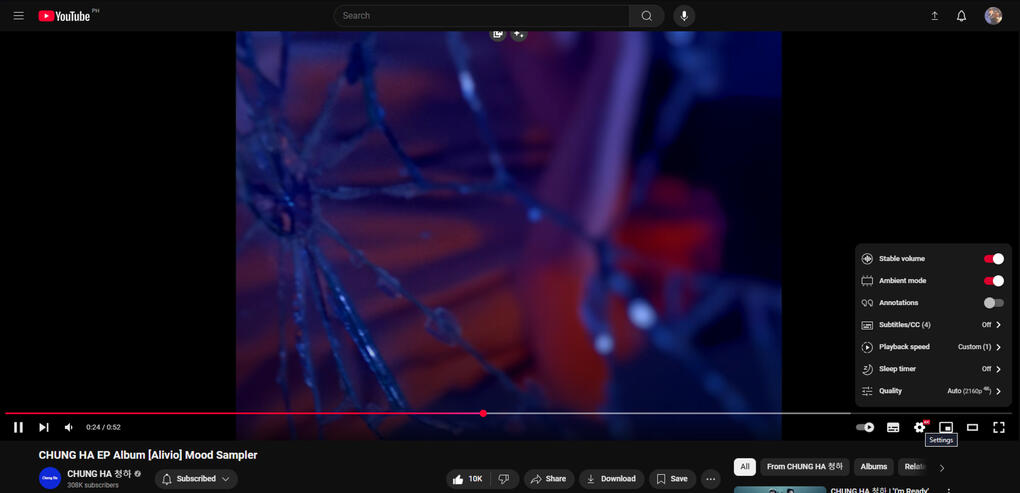
1. Open YouTube on PC or on the mobile app
2. Type CHUNGHA STRESS on the search bar
3. Click the video that is uploaded on CHUNGHA's Official YouTube Channel
4. Play the music video entirely in a quality of 480p or higher and volume at 50%
5. Like the music video and leave a positive comment. Share the video too!
6. Watch 3 other CHUNGHA related videos (interviews, performances, fancams, and other music videos)
7. Repeat all of the steps! (Excluding liking + commenting if you have done so already!)
DON'TS
1. Using multiple tabs to stream
2. Using incognito mode or a private browser
3. Activating an adblocker or other irregular adds on
4. Deleting your view history on YouTube and your cache
5. Skipping, pausing, and speeding up the video
6. Refreshing the page and/or replaying the video
8. Muting the YouTube player volume
9. Spamming comments and engaging with negative comments. DO NOT REPORT NEGATIVE COMMENTS.
10. Using a playlist within 48 hours
11. Watching 3-4 videos from the same channel
POINTERS
― Turn off autoplay
― Use multiple different browsers
― Skipping ads is allowed
― If you see EENIE MEENIE Music Video being recommended, please click it!
― Don't be alarmed if the views freeze, continue to stream and do your best!
― For views to count towards Billboard charts, US users should be logged into their account while streaming on YouTubeFOR YOUTUBE PREMIUM USERS
― Videos playing on background count as stream
― You can use the playlist after 24 hours for streaming
― You can watch 2-3 other CHUNGHA related videos

HOW TO SIGN UP
1. Download the app:
IOS l ANDROID l PC2. Sign up with Google, X (Twitter), Apple, or your mobile number3. Connect your account with SPOTIFY or APPLE MUSIC
NOTE: Your account needs to be PREMIUM to be able to participate and stream4. Make sure to search CHUNGHA and follow her!
HOW TO JOIN
1. Type HAART on the search tab
2. Click the HAART channel
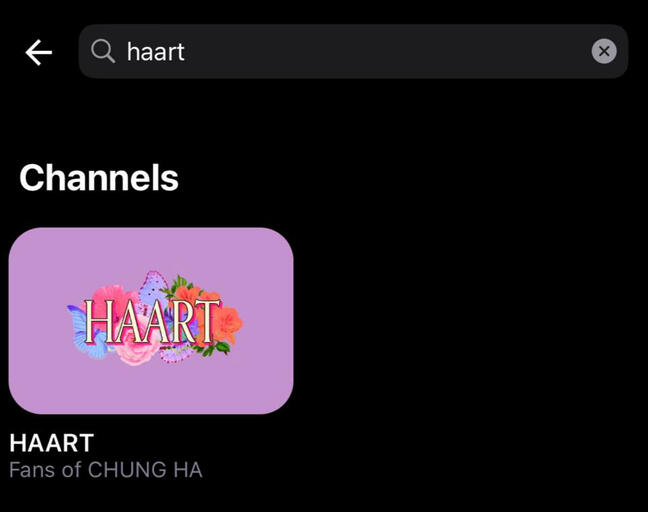
3. Join the listening party!
4. Do not put the volume on MUTE
5. You can send requests which song you want to play to the current host
― Click the + beside on the bottom right corner of the screen
― Click 'Request song'
― Search the song you're going to request in your Spotify or Apple Music library
― Click the song and send request!
POINTERS
― Hosts will create and regulate the playlist for everyone to enjoy. You can join and stream with fellow HAARTS!
― 1 listener = 1 stream!
― Check CHUNGHA's Official Page's announcement or schedule for the listening party
― You may join CHUNGHA GLOBAL's listening party when MVSN is not hosting one
― Playing it in the background still counts as a stream
― Do not send negative comments and spam messages
― You can request western or other K-POP artist songs to the host (but preferably that are not currently promoting)
― Commenting or chatting is not obligatory! You can just come in and stream and do your work!

PRESAVE ALIVIO [HERE!]
HOW TO
1. Open Spotify app or web player for PC
2. Go to "Your Library"
3. Click on "Playlists"
4. Select a playlist to stream
5. Press PLAY or SHUFFLE
WHAT TO AVOID
1. Don't MUTE the volume on Spotify while streaming or it won't be counted
2. Do not put the song on loop. This can be seen as spam.
3. Continuous streaming or no skips can be seen as bot-like behavior.
4. Avoid using the same playlist for streaming. Try using other HAARTS' playlists for streaming.
POINTERS
― Type CHUNGHA on search tab and click her profile
― Follow CHUNGHA
― Create and use a playlist
― Playing a song for 30+ seconds counts as a complete and valid stream
― Streaming offline and downloaded songs count as a stream (for premium users only)
― Make sure to share the link of 'EENIE MEENIE' through social media
― USA based streams will count towards Billboard chart

HOW TO purchase
1. Open iTunes app or web player for PC
2. Search for EENIE MEENIE
3. Click on the price and purchase the song

HOW TO stream
1. Open Apple Music app or web player
2. Search for EENIE MEENIE
3. Click and hold the song for options
4. Remove and Delete from Library
5. Stream the song on Apple Music
pointers
― If you purchased the song previously, delete it and stream so it counts
― Deleting a song from your library does not undo your purchase, you can restore it later
― With full albums, do not purchase every song simultaneously. Purchase each song separately to count towards Billboard charts.
― Gifted songs/albums will not count as a proper stream
WHAT TO AVOID
1. Continuous streaming or no skips can be seen as bot-like behavior.
2. 2. Do not put the song on loop. This can be seen as spam.

how to join
1. Visit SCENER on your laptop or PC
2. Add Scener extension on Google Chrome browser
3. Create a scener account (it's easy and free!)
4. Search for scener parties (follow CHUNGHA GLOBAL for updates and announcements!)
do's
1. APPLY YOUTUBE DO'S ON SCENER STREAMING PARTY
2. Always log in into your YouTube and Scener accounts when joining a streaming party
3. Skip YouTube ads after 30 seconds.
4. Skip Scener ads when the button is available
5. You can use scener up to 3 hours in a row. After 3 hours have passed, you need to take a break for more than 2 hours.
don'ts
1. APPLY YOUTUBE DONT'S ON SCENER STREAMING PARTY
2. Do not use the same device or IP when participating in a scene party.
3. Do not mute the Scener tab and/or YouTube player.
NOTE: You can mute your laptop/PC
4. Do not join multiple scener parties. Take a break for more than 2 hours between parties.
pointers
You don't need YouTube or Scener Premium to join
― When the video pauses or skips, do not be alarmed. The views still count.
― You can like, comment, and share the video, BUT you can't pause or change the video.
― 1 participant = 1 stream!
― The host will regulate the playlist for you when you're too busy managing your streaming schedule!
― You can leave the Scener party playing in the background
― You can request what video you want to play next to the host
MELON
fix your playlist's setting
― Click playlist (≡) to the right of the song being played on the main page (🏠)
― Click '재생환경 설정' (⚙) at bottom left
― Click '재생목록 설정'
― Choose '목록 맨 끝' on [재생목록 곡 담기 설정]
― Choose '중복곡 포함하고 담기' on [중복 곡 담기 설정]
― Choose '재생목록 유지' on [기존 재생목록 삭제 설정]
how to stream
― Add EENIE MEENIE album
― Add the suggested songs in the album. Follow the Streaming Playlist Guide
― Choose songs
― Click '담기' (+)
― Click '재생목록에 담기'
― Click the album cover image at bottom right
― Activate 🔁 at bottom right
― Disable 🔀 at bottom right
― Like EENIE MEENIE and I'M READY
how to download 'EENIE MEENIE'
― Search EENIE MEENIE
― Click '다운로드' (📥)
― Make a purchase '개별곡 구매' or 'FLAC 구매')
― Click '나만의 음악서랍' at bottom right(⌹)
― Click '다운로드한' (📥)
― Click '저장된 콘텐츠' (🗂)
― Click '곡'
― Click '편집' at top right
― Click '전체선택' (✓)
― Click '삭제' (🗑)
― Click '확인'
― Click '완료' at top right
don't forget!
― Like the EENIE MEENIE album
― Click '앨범 정보' and give a rating
(Click ☆☆☆☆☆ and click '확인')
― Like album photo
― Like '이 앨범의 영상'
― Like '이 앨범의 매거진'
― Put a comment under EENIE MEENIE album
― Like album comments